
Quick Presets
THEME COLOR
Accent Color
Theme the whole UI
DISPLAY CONTROLS
144.0 FPS
2560 × 1440 @ 240Hz
Fine-tune colours for maximum in-game visibility.
Hardware Color Controls
Fine-tuned hardware gamma & color matrix adjustments
100%
100%
100%
1.00
1.00
0%
6500K
0%
0%
0%
Master Hardware Monitor Reset
EMERGENCY RECOVERY
Instantly clears active ramps and resets display to linear baseline.
PRESETS
Save, share, and switch instant color configurations.Save, organize and instantly apply your display profiles.
IMPORT & SHARE
📁
Import .chromax File
Drag and drop or browse
Preset Key
Paste a key code to instantly import settings
BUILT-IN
MY PRESETS
Auto-Apply Game Profiles
ENABLED
Automatically switch profiles when launching or tabbing into games.
Automatically applies custom presets when focused in games and restores desktop defaults when tabbed out.
Real-Time Focus Monitor
Active foreground process detected by ChromaX.
No Game Detected
Windows Desktop Focus
DESKTOP ACTIVE
Registered Game Detection Rules
Toggle individual games on or off, assign presets, or delete rules
Add Game or Application Rule
Select a running app or enter an executable name.
Game Profiles Overview
Manage tailored color profiles assigned to individual games.
Customize color profiles for supported games.
Custom Esports Precision Cursor
DEFAULT WINDOWS
Enhance aim clarity with custom cursors and weapon hue amplification.
Pixel-perfect crosshair and pointer styles for desktop and games.
PREVIEW
Cursor Style
Cursor Color
SIZE
24px
CROSS GAP
3px
Custom Crosshair Overlay
Hardware-accelerated center screen crosshair overlay.
COLOR:
SIZE
1.0x
GAP
4px
Enemy Outline & Target Hue Amplifier
Sample any pixel on screen to amplify target outline visibility.
OUTLINE COLOR
AMPLIFIER STRENGTH
0%
PICK OR SAMPLE A TARGET HUE
POPULAR ENEMY OUTLINE PRESETS:
DirectPanel™ Hardware Engine
HARDWARE DIRECT: ACTIVE
Adjust monitor hardware black equalizer and stretched resolution directly.
Direct hardware communication with monitor DSP (VESA DDC/CI).
0%
100%
TARGET HARDWARE DISPLAY
Primary Monitor
1920 × 1080 @ 60 Hz (16:9 Native)
SWITCH MONITOR:
Live Stretch Hitbox Simulator
4:3 STRETCHED
Preview model hitbox stretch factor before applying.
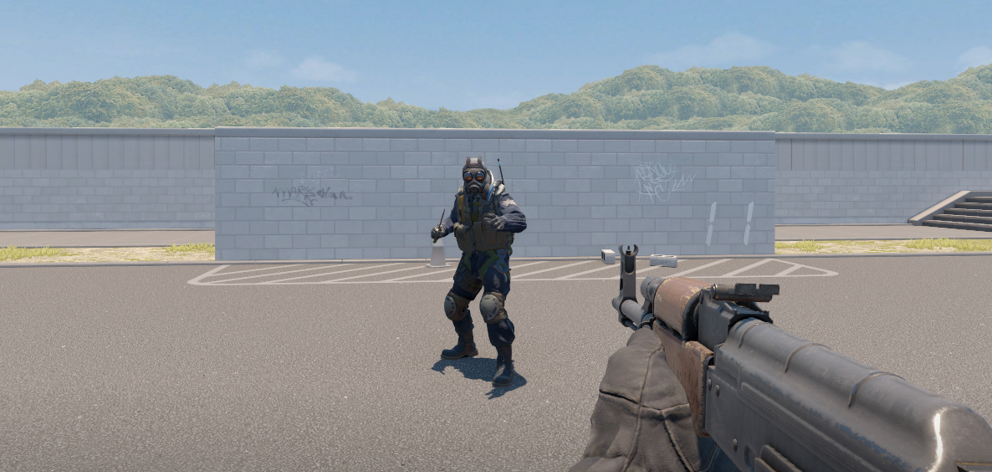
Currently previewing: 1440 × 1080 (1440x1080 Stretched). Hitbox is stretched +33.3% wider.
Standard & Competitive Presets
Select a preset to preview its stretch factor and apply.
1920 × 1080
16:9
Native Baseline (1.00x)
1440 × 1080
4:3 PRO
+33.3% Wider Player Hitbox
1280 × 960
4:3
CS2 / Valorant Standard
1728 × 1080
16:10
Balanced +11% Hitbox Widening
1680 × 1050
16:10
High Refresh Rate 16:10 Mode
1024 × 768
4:3
Max FPS CS 1.6 Classic
1280 × 1024
5:4 ULTRA
Aggressive +42% Hitbox Stretch
Custom Resolution & Refresh Rate
Set custom resolution and refresh rate overrides.
QUICK REFRESH RATE OVERRIDES:
System Performance & Telemetry
Monitor display refresh rate, telemetry, and GPU LUT acceleration.
Real-time hardware monitoring and display framerate statistics
DISPLAY REFRESH
240 Hz
TARGET FRAMERATE
144.0 FPS
ENGINE LATENCY
< 0.1 ms
RAM USAGE
Optimized
Hardware Acceleration Mode
Zero-overhead VESA DDC/CI and GPU LUT pipeline acceleration
GPU LUT Kernel
Direct hardware gamma ramp without background polling
Keybinds & Controls
Customize menu toggle hotkeys and interface appearance.
Configure in-game shortcuts and overlay controls
ChromaX Menu Toggle
Music Overlay Unlock Key
Streamer & Creator HUD Watermark
LIVE OVERLAY
Shows active color profile and creator code overlay.
LIVE BANNER PREVIEW:
COLOUR ENHANCED WITH CHROMAX
Background Presets & Custom Art
Choose from premium background GIF presets or load custom animated artwork
PRESET ANIMATIONS
Chroma (Base)
Standard Theme
Classic (Preset 1)
Alternate Option
+
OLED Cinema
High Contrast
+
Cyber Glow
Deep Neon
+
Midnight
Low Blue Light
Text Color & Brightness
Customize the text color and luminance
BRIGHTNESS
100%
UI Theme Accent
Choose a custom accent color
Logo Size
Adjust the sidebar brand logo size
LOGO HEIGHT
48px
FACTORY RESET ALL SETTINGS
Restore all settings, profiles, and themes to factory defaults.
In-Game Desktop Music Player Overlay
LIVE WIDGET
Control background music with a lightweight in-game floating widget.
Compact floating widget with media controls and album art.
Overlay Accent Theme
Auto-matches media player theme or select custom accent.
Glass Background Opacity
75%
Adjust widget glass transparency.
Overlay Size Scale
100%
Scale widget size for your display.
Lock / Unlock Keybind
Press this key in-game to interact with or drag widget.
AI Footstep Sound Amplifier
Neural audio processing to isolate footsteps and movement.
AI Footstep Frequency Isolation
Boosts footstep frequencies (150Hz - 800Hz).
+6dB
Dynamic Range Compression & Loudness Equalizer
Amplifies quiet cues while dampening loud explosions.
40%
50%
2.5:1
Real Ambient Soundscapes
Field recordings. High-fidelity lossless ambient audio recordings (CC0)
AMBIENT VOLUME
70%
SELECT A SOUNDSCAPE
Thunderstorm
DEEP RUMBLE
Heavy Rain
WHITE NOISE
Ocean Waves
DYNAMIC SWELLS
Forest Birds
HIGH FREQUENCY